gitgate

Open source · MIT or Apache-2.0

Push to GitHub from machines that never log in.

gitgate is a git gateway for your private network. It adds one credential, a GitHub App or a personal access token, and streams git to GitHub, so no box needs a login of its own.

Written in Rust. One static binary or a distroless image. Linux and macOS.

Real output from gitgate in front of a local git server. A branch goes through; main and a tag are refused at the gate.

Two modes

The URL decides what a machine may do.

Point people and trusted machines at managed. Point agents and automation at unmanaged. A URL that names no mode gets GITGATE_DEFAULT_MODE, which is unmanaged unless you set it.

Managed

https://gate.example/managed/<owner>/<repo>.git
  • Everything the credential may do
  • Any branch, including the default branch
  • Tags and releases
  • Deleting branches and tags

For people, and for machines you trust with the credential's full reach.

Unmanaged

https://gate.example/unmanaged/<owner>/<repo>.git
  • Fetch and clone
  • Push ordinary branches
  • The default branch, main, master, production, release/*, releases/*
  • Tags, so no releases
  • Anything outside refs/heads/

For agents and CI-like jobs: they push branches, people merge.

A refused push is refused whole, before a byte goes to GitHub.

  • Protected branchThe default branch, or a match for GITGATE_PROTECTED_BRANCHES: unmanaged: main is protected
  • Tagunmanaged: no tags (a tag cuts a release), unless you allow tags
  • Other refsunmanaged: branches under refs/heads/ only
  • Unreadable pushesSigned, shallow and compressed pushes are refused, because gitgate would not read them

gitgate answers with git's own per-ref report, so git push prints the reason. Branch deletes are allowed by default and can be turned off.

How it works

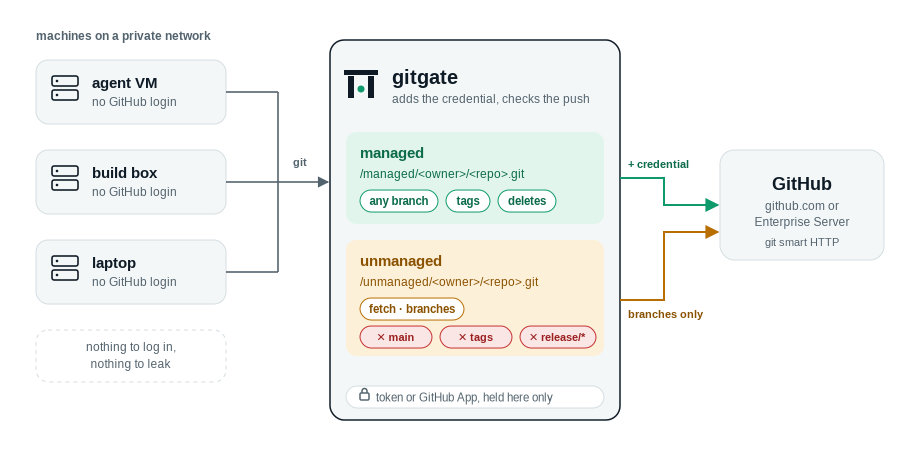
Machines, one gate, GitHub.

Git talks to gitgate over HTTP, as it would to GitHub. gitgate holds the credential and checks the push.

  1. Route

    git's smart-HTTP requests are served: info/refs, git-upload-pack, git-receive-pack, and Git LFS's batch and locks APIs. With GITGATE_API_LEG on, a policy-checked GitHub API for gh too. No web pages.

  2. Admit

    A caller is admitted to a mode by its address or by that mode's secret. With nothing configured, nobody is admitted.

  3. Check

    In unmanaged mode the push's commands are read first and checked against the policy.

  4. Stream

    gitgate adds the credential and streams git to GitHub in both directions, with no buffering and pooled connections upstream.

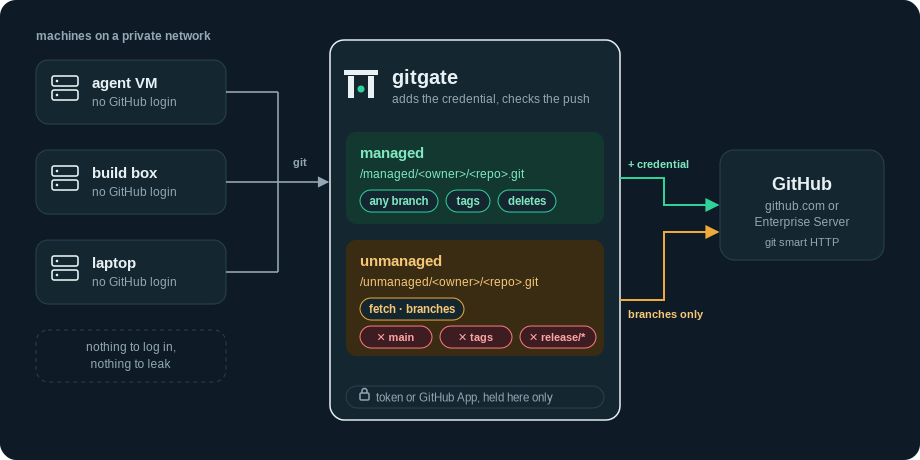
Three machines with no GitHub login (an agent VM, a build box, a laptop) talk to gitgate. gitgate holds the token or GitHub App credential. Managed mode passes any branch, tags and deletes to GitHub; unmanaged mode passes fetches and ordinary branches and refuses main, tags and release branches.

Why a gate

One credential to guard, and a line that stays drawn.

Nothing to leak

The token or GitHub App key lives in one place. Machines hold no login and no token, and you rotate in one place. With a GitHub App, installation tokens are minted and renewed in memory.

Drawn at the gate

Branch protection alone does not stop an agent's token from cutting a release or touching main where it is not enabled. Unmanaged mode refuses those pushes before they reach GitHub.

Keeps your remotes

A url.<base>.insteadOf rewrite sends https://github.com/<owner>/ and git@github.com:<owner>/ through the gate, so clones and submodules need no change.

6.92 scloning a 256 MB repository straight from the upstream, best of 3
6.90 sthe same clone through gitgate, best of 3

From the repository's own benchmark (cargo test --release --test git bench -- --ignored --nocapture): one run on an arm64 Linux VM over loopback, against a local git http-backend, so it measures gitgate's overhead and not a network. Your numbers will differ.

Install

Run it, then point git at it.

Release builds are signed with minisign. Run gitgate on a private network, behind a TLS proxy such as Caddy, nginx or tailscale serve, or give it a certificate of its own.

1. Install and configure

A token, the owner you serve, and who may use each mode. Every setting is an environment variable.

# the release build, checked against SHA256SUMS (and minisign, if installed)
curl -fsSL https://raw.githubusercontent.com/ailio-technologies-inc/gitgate/main/install.sh | sh
# or from source
cargo install --locked --git https://github.com/ailio-technologies-inc/gitgate

# .env
GITGATE_LISTEN=0.0.0.0:8080
GITGATE_TOKEN_FILE=/run/secrets/github-token
GITGATE_OWNERS=acme
GITGATE_UNMANAGED_FROM=10.0.0.0/8
GITGATE_MANAGED_SECRET_FILE=/run/secrets/gitgate-managed

gitgate

2. Point git at the gate

On each machine. Use /managed/ where full access is needed.

git config --global url."https://gate.example/unmanaged/acme/".insteadOf "https://github.com/acme/"
git config --global --add url."https://gate.example/unmanaged/acme/".insteadOf "git@github.com:acme/"

git clone https://github.com/acme/infra     # goes through gitgate

Or run the container: docker run --env-file .env -p 8080:8080 gitgate, built from the repository's Dockerfile (static musl on distroless, non-root).

Questions

What people ask.

Does this replace GitHub branch protection?

No. What a push may do upstream is still the credential's, and GitHub's branch protection applies to gitgate's credential like anyone's. Unmanaged mode is a second lock for machines you do not want to push to main or cut releases.

Which credentials can it use?

A personal access token (fine-grained or classic), from the environment or a file that is re-read every minute, or a GitHub App. With an App, gitgate signs a short-lived JWT, finds the owner's installation, mints an installation token for the one repository and purpose at hand (read for a fetch; write without workflows for an unmanaged push), and renews it before it expires. Installation tokens are kept in memory only.

Does it work with GitHub Enterprise Server?

Yes: set GITGATE_UPSTREAM to the host and GITGATE_API to its /api/v3.

How does it know who is calling?

By address (IPs and CIDRs, with X-Forwarded-For believed only from GITGATE_TRUSTED_PROXIES) or by a per-mode secret sent as a Basic password or Bearer token. Whatever admits a caller to managed admits it to unmanaged; nothing admits an unmanaged caller to managed.

Is it a GitHub API proxy? What about LFS?

Git LFS's batch and locks APIs are proxied with gitgate's credential, so LFS repositories clone and push through it. The GitHub API is off by default; with GITGATE_API_LEG=true gitgate serves a narrow, policy-checked REST and GraphQL pass-through, so stock gh can open draft pull requests from branches an agent may push, comment and read checks, with a token that cannot write code. No web pages are proxied.

Does it terminate TLS?

No. Run it on a private network or behind a TLS proxy. The /healthz, /readyz and /metrics endpoints are not admission-checked, so keep gitgate off networks you do not trust.

What is not covered in unmanaged mode?

Signed (push-cert), shallow and compressed pushes are refused, because gitgate would not read them. A push whose command section is over GITGATE_MAX_COMMAND_BYTES is refused too.

What is the license?

MIT or Apache-2.0, at your option.

Let the machines push. Keep the keys.